The Send Message and Wait for Reply widget has the following configuration abilities:
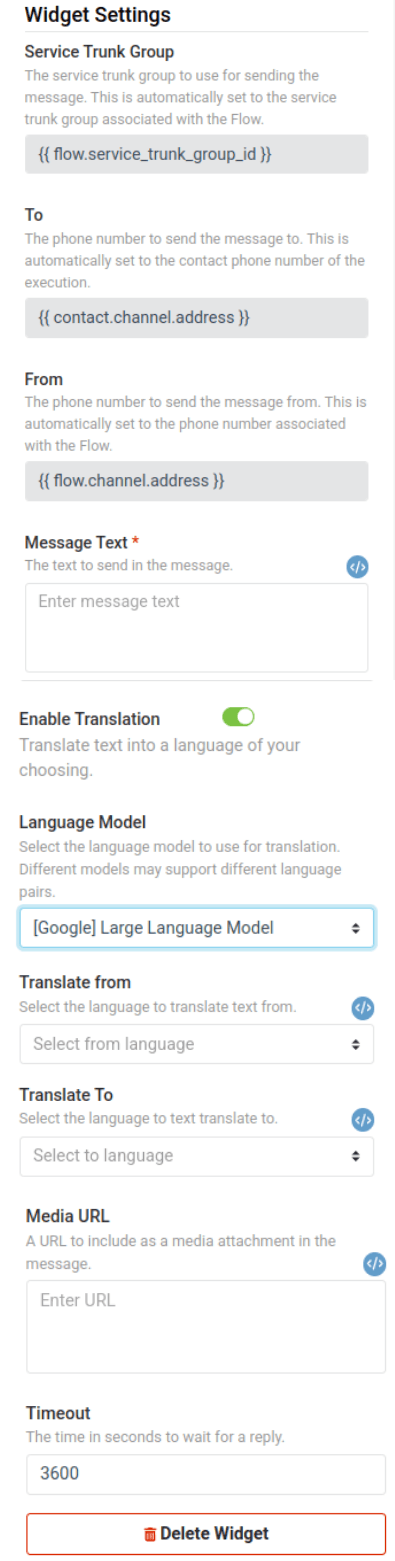
Service Trunk Group (read-only)
The service trunk group that the destination number belongs to. This field is automatically populated with the service trunk group associated with the Flow execution, and it cannot be changed.
To (required)
The phone number to send the message to. This field is automatically populated with the number being contacted, and it cannot be changed.
From (required)
The phone number to use as the Toll Free Number or 10-DLC when sending the message. The number must be associated with the provided Service Trunk Group and must be an enabled Toll Free Number (TFN) or 10-DLC. This field is automatically populated with the number associated with the Flow execution, and it cannot be changed.
Message Text (required)
The text to send in your message.
Enable Translation (optional)
Whether to translate the message text to another language. If this option is selected, you will be able to choose the language model, source language, and destination language for the translation.
Language Model (optional)
The type of translation model and vendor to use. Currently we only support Google as a vendor. Text is billed in 100 character intervals and pricing is based on the model selected.
- [Google] Large Language Model: use Google’s LLM to translate text. The LLM supports fewer language pairs than the NMT model, but large language models tend to generate more natural sounding translations.
- [Google] Neural Machine Translation: use Google’s NMT model. The NMT model supports many more language pairs, but may not be as natural sounding as a LLM.
Translate From (required if Language Model is selected)
The language to translate from. The input text should be typed in this language. Automatic language detection is only supported if the user chooses to use the NMT model.
Translate To (required if Language Model is selected)
The language to translate to.
Media URL
A URL to use as a media attachment for MMS messages.
Timeout
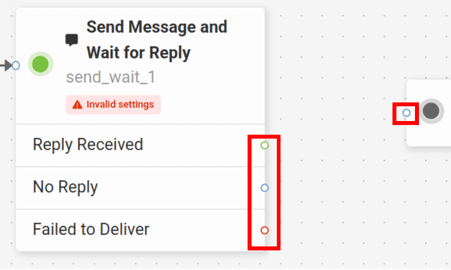
The number of seconds to wait for a reply. If a reply is not received within the specified timeout, then the “No Reply” event will be triggered.