
Customer communication should do more than deliver a message. It should make it easy for recipients to respond, provide information, and complete important tasks.
That is why Voxtelesys is introducing Capture, a new data-collection capability available through missio™ Canvas and the Capture Builder.
Capture gives organizations a no-to-low-code way to create structured surveys, forms, questionnaires, and conversational workflows. Teams can gather customer feedback, service requests, outage information, consent confirmations, appointment details, account updates, eligibility responses, and other operational data directly from recipients.
Turn One-Way Messages into Two-Way Conversations
Traditional surveys and static forms often require recipients to leave the communication channel, open another application, or navigate an unfamiliar process.
Capture creates a more direct and conversational experience.
Organizations can ask targeted questions, collect responses, apply conditional logic, store results, and guide each recipient through a structured interaction. Depending on the use case, Capture can be delivered through Messaging (SMS/MMS), RCS, or Email.
This makes Capture well-suited for workflows such as:
- Customer satisfaction surveys
- Outage and emergency-response updates
- Appointment scheduling and confirmations
- Service requests
- Consent and preference management
- Account-information updates
- Eligibility questionnaires
- Employee or customer check-ins
Two Flexible Capture Options
Capture supports two primary delivery models: Canvas Native Capture and Web Capture.
Canvas Native Capture
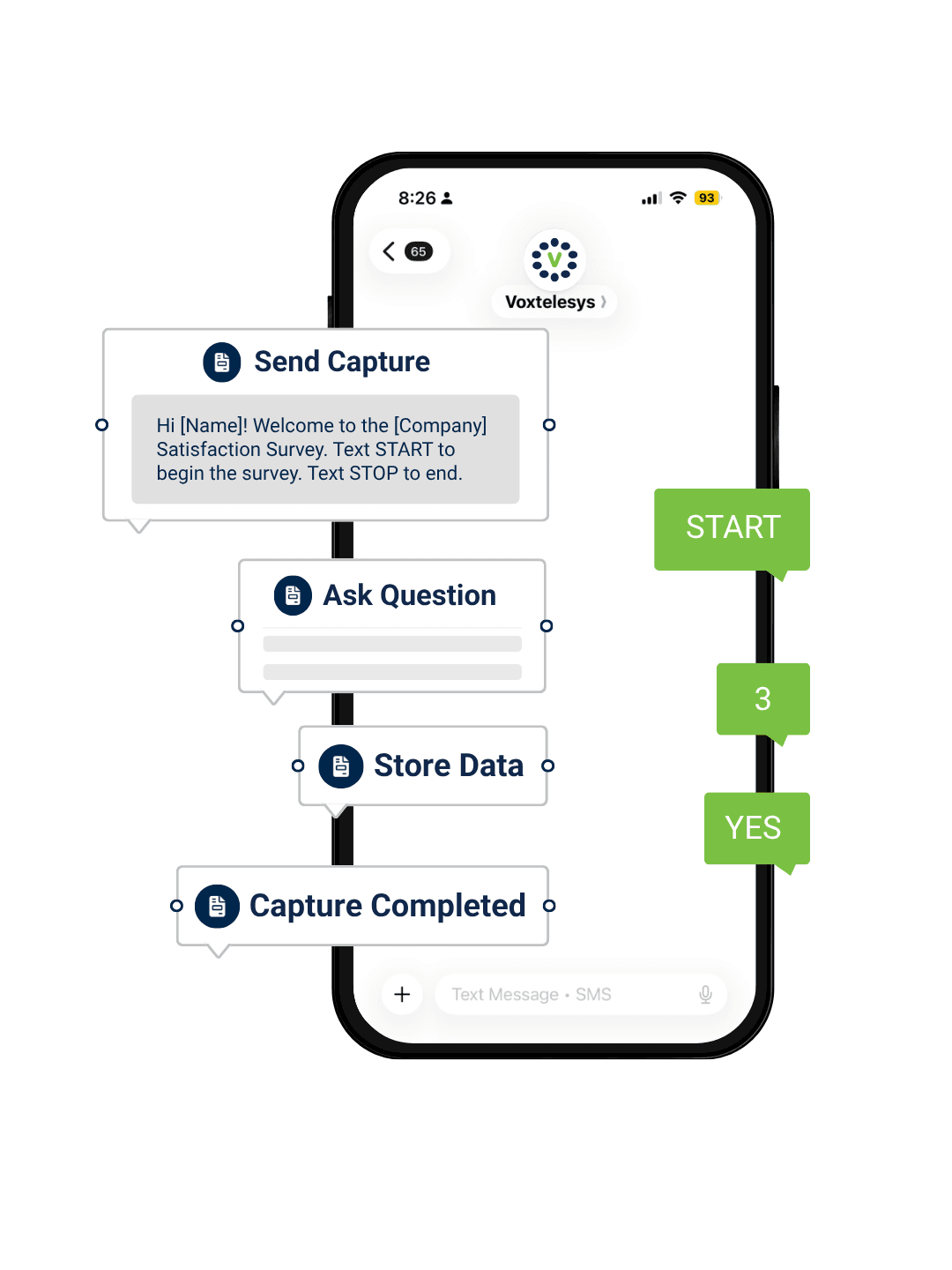
Canvas Native Captures are created and managed directly within missio™ Canvas. The entire interaction takes place through supported messaging channels, including Messaging (SMS/MMS), and RCS. Rather than sending a link to a separate form, organizations can ask questions and collect responses directly within the messaging conversation. Canvas can then apply business logic, process the responses, store the resulting data, and direct the recipient to the appropriate next step.
Canvas Native Capture is ideal when organizations want:
- A fully conversational workflow
- Real-time customer responses
- Precise control over each interaction
- Conditional routing based on answers
- Data collection within an existing Canvas flow
Web Capture
Web Captures are created through the Capture Builder and delivered through a trackable link.
Recipients can receive the link through Messaging (SMS/MMS), RCS, or Email and complete the Capture through a branded web interface. Web Capture does not require additional Capture widgets after the Capture has been built and connected to the Send Capture widget.
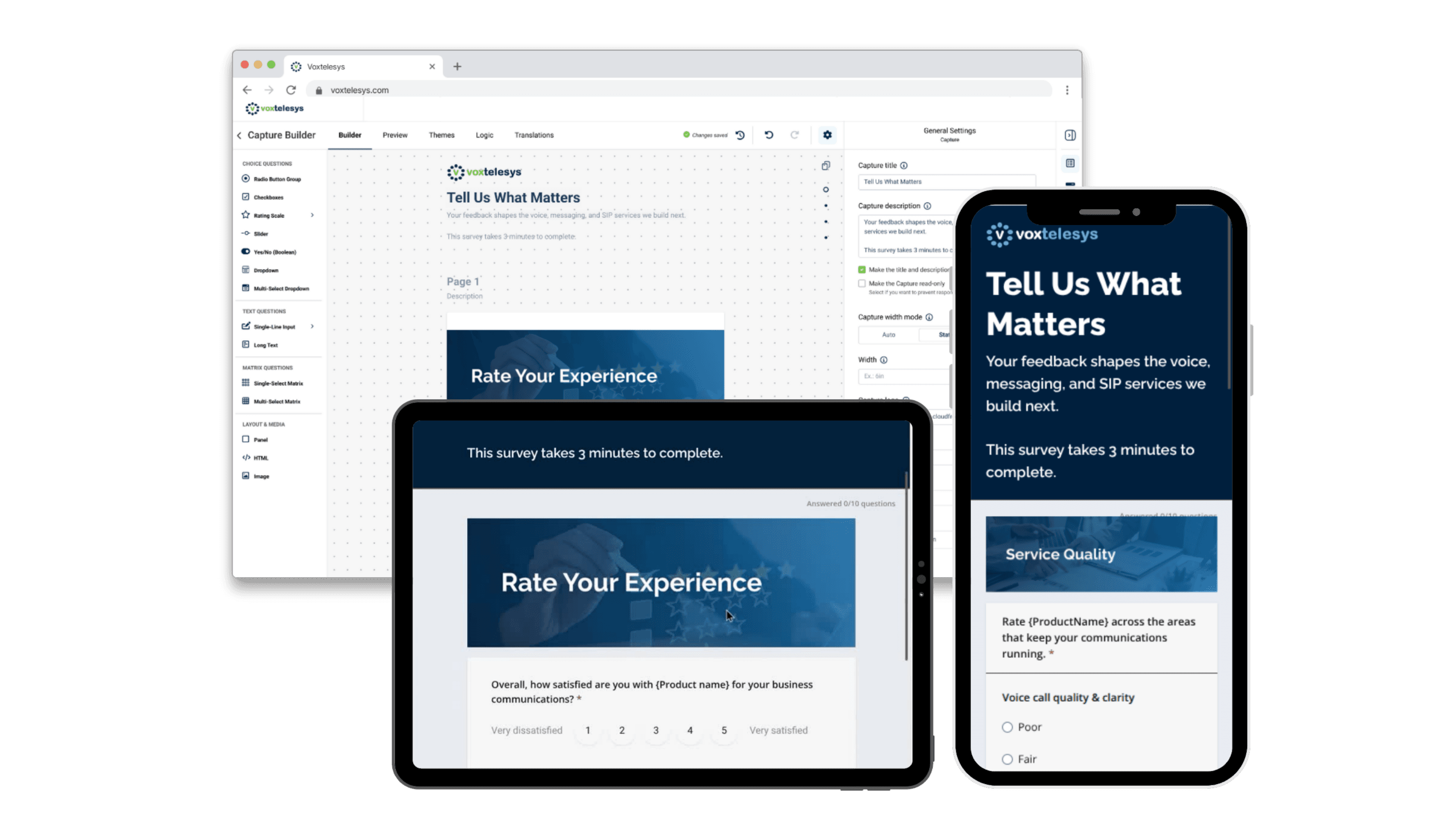
The Capture Builder allows teams to:
- Create open-text, multiple-choice, and rating questions
- Add conditional logic and branching
- Customize fonts, colors, and layouts
- Translate content for different audiences
- Build sophisticated forms without custom development
The result is a flexible, branded data-collection experience that can be adapted to different departments, markets, and customer journeys.
Build Capture Workflows with Four Canvas Widgets
Capture introduces four purpose-built widgets within missio™ Canvas.
Send Capture
The Send Capture widget initiates the interaction. It can launch a Canvas Native Capture or deliver a trackable link to a Capture created in the Capture Builder.
Teams can configure an optional greeting and select the appropriate delivery channel.
Ask Question
The Ask Question widget sends targeted questions to recipients through Messaging (SMS/MMS), or RCS.
Organizations can use multiple Ask Question widgets to create a step-by-step conversation and connect responses to conditions, routing logic, or additional processing.
Store Insights
The Store Insights widget saves recipient responses to the database.
Responses can be organized using key-value mapping, allowing organizations to structure the collected information and connect it to customer records, reporting tools, or downstream workflows. Teams also control exactly where data is stored within the Capture flow.
End Capture
The End Capture widget formally concludes the interaction and records the final outcome.
Organizations can configure different completion paths, including completed, failed, or stopped sessions. They can also provide failure reasons and deliver a personalized closing message to the recipient.
A Simple Capture Workflow
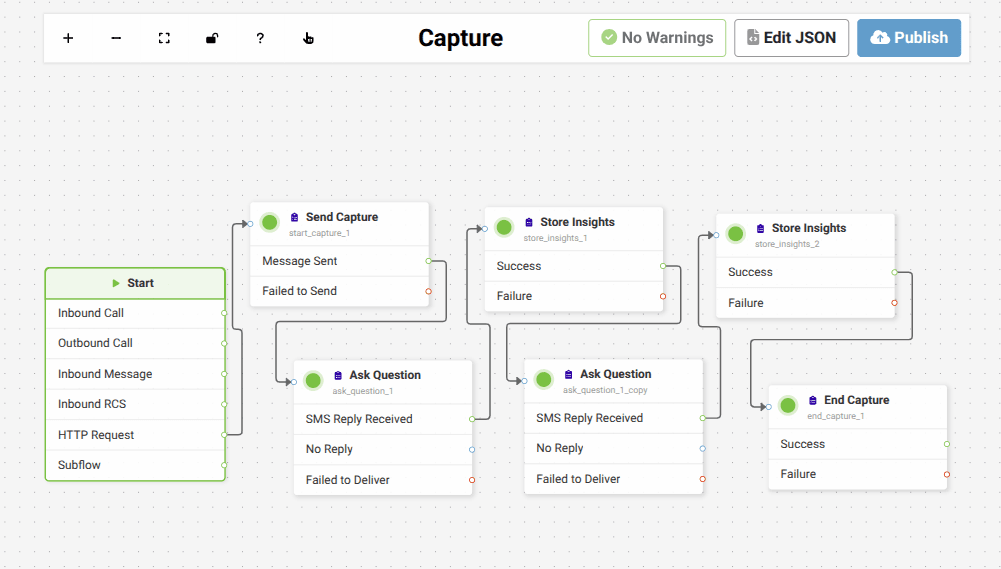
A basic Canvas Native Capture can follow four steps:
- Initiate Capture with the Send Capture widget.
- Ask Questions through Messgaing (SMS/MMS), or RCS.
- Store Data using Store Insights.
- End Capture with a defined and trackable outcome.
From there, organizations can expand the workflow with additional questions, conditions, translations, routing rules, and data-processing logic.
Reach More Customers with Translation and Channel Fallback
Capture is designed to support communication across different audiences and devices.
Smart Content Translation can translate message content across supported messaging and RCS channels. When RCS is selected, organizations can also configure SMS/MMS fallback so recipients can still receive the communication when their device does not support RCS.
This helps organizations create more inclusive workflows while improving the likelihood that each message reaches its intended recipient.
From Communication to Actionable Data
Capture brings data collection directly into the customer communication workflow.
Instead of relying on disconnected surveys, manual follow-up, or one-way notifications, organizations can create structured conversations that collect actionable information in real time.
With missio™ Canvas and Capture, teams can:
- Communicate across multiple channels
- Gather structured customer responses
- Apply business rules and conditional logic
- Store and organize response data
- Track completion outcomes
- Create repeatable workflows without extensive development
Capture helps organizations move beyond simply sending messages. It provides a practical way to listen, respond, and turn every interaction into meaningful operational insight.
Learn More
Capture is available through the Voxtelesys Portal using missio™ Canvas and the Capture Builder.
Contact the Voxtelesys Sales Team to learn how Capture can support your customer engagement, notification, survey, and data-collection workflows.