Learning Hub / Tutorials / Voxtelesys / RCS Platform Behavior DifferencesFAQs

Tutorials: RCS Platform Behavior Differences

RCS messages appear differently on Android and iOS devices. Differences include rich card size and orientation, contact page visibility, carousel appearance, and button and action behavior. The sections below explain specific differences and recommended practices.

Required Access: Voxtelesys Portal


Disclaimer: You must register to become a verified sender before using RCS. Please open a Support Ticket to initiate the process.


Table of Contents


Last Updated: 8/28/2026

RCS (Rich Communication Services) is the next generation of mobile messaging. It builds on standard SMS to support rich media, interactive buttons, carousels, and branded messaging, turning a plain text thread into a dynamic conversation. RCS messages are configured and delivered through missio™ Canvas in the Voxtelesys Portal.


How RCS looks and behaves depends on the device receiving it. Android and iOS handle RCS features differently, so a message that renders one way on an Android phone may appear differently on an iPhone.


Differences include rich card size and orientation, contact page visibility, carousel appearance, and button and action behavior. This tutorial walks you through those differences so you know what your recipients actually see.

information icon
Note on SMS/MMS Message Length
SMS/MMS messages are sent in 160-character segments.

RCS compatibility varies by carrier, region, and device.

To make sure your message always reaches its recipient, configure an SMS/MMS fallback in the widget.

Your message then delivers regardless of device or carrier support.

RCS message rendering varies between Android and iOS. The table below outlines key behavioral differences to consider when configuring your messages:


Behavior

Android

iOS

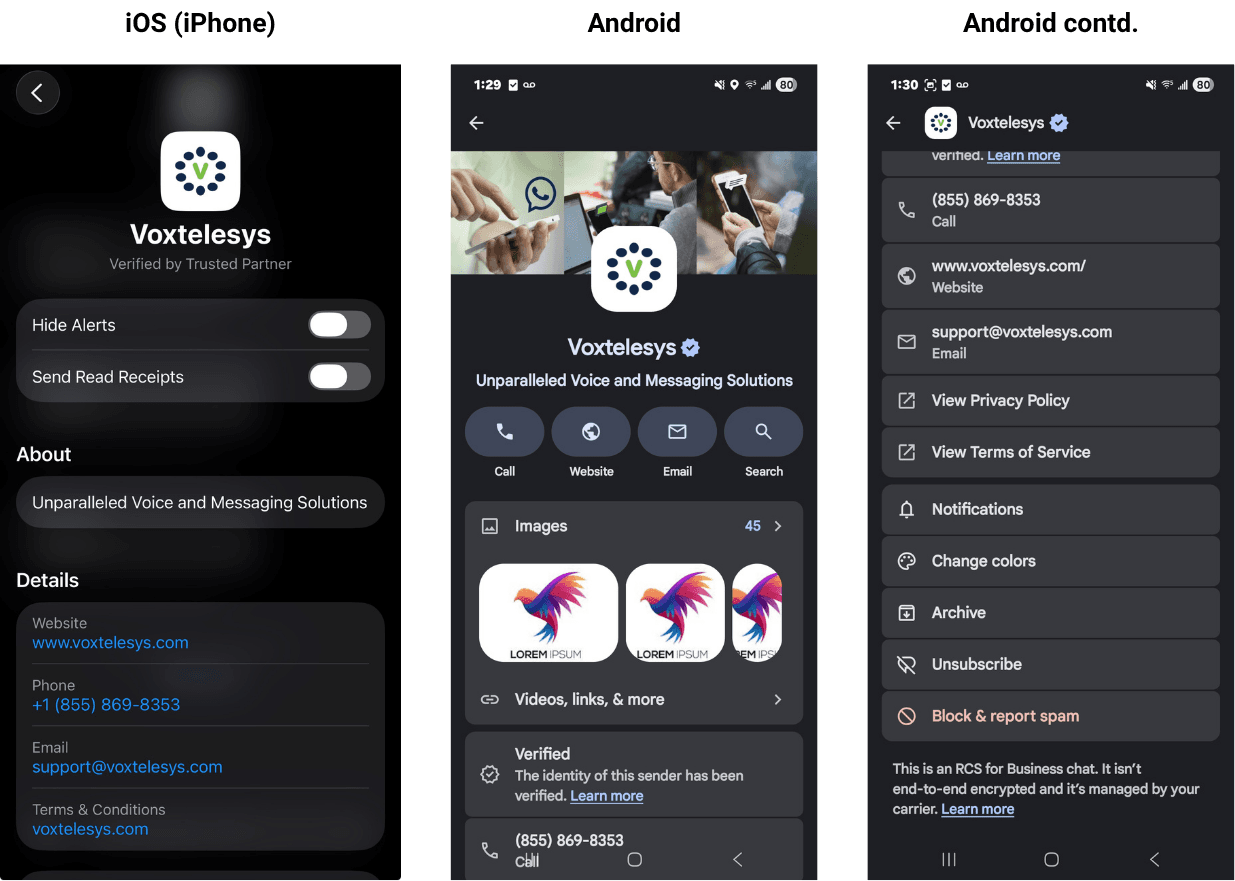
RCS Sender Profile All contact information is visible Does not display some contact information, specifically the banner image.
Card Height Supports all heights (Short, Medium, Tall) Renders at a single fixed height
Card Orientation Supports vertical and horizontal Vertical only (Horizontal cards render incorrectly)
Carousels Rich cards render in full size with description and title visible Rich Cards may have limited title and description visibility. If larger text is used on an iOS device, then the images may be truncated
Actions & Buttons Secondary actions disappear after being clicked; primary buttons remain after being clicked. All buttons & actions display as intended. All actions remain visible after being clicked; the buttons & actions may appear in incorrect order; replies may group. Secondary actions appear in “Options” dropdown attached to the message.
GIF Playback Animated Displays as a static image

RCS Sender Profile Visibility

The image below outlines the general differences between iOS (left) and Android (right) on the agent contact page.


example images of the agent contact page on Andrioid and iOS


Android displays all Contact information, including the company’s banner image (shown above). iOS does not display the header image.

Rich Card Height & Orientation

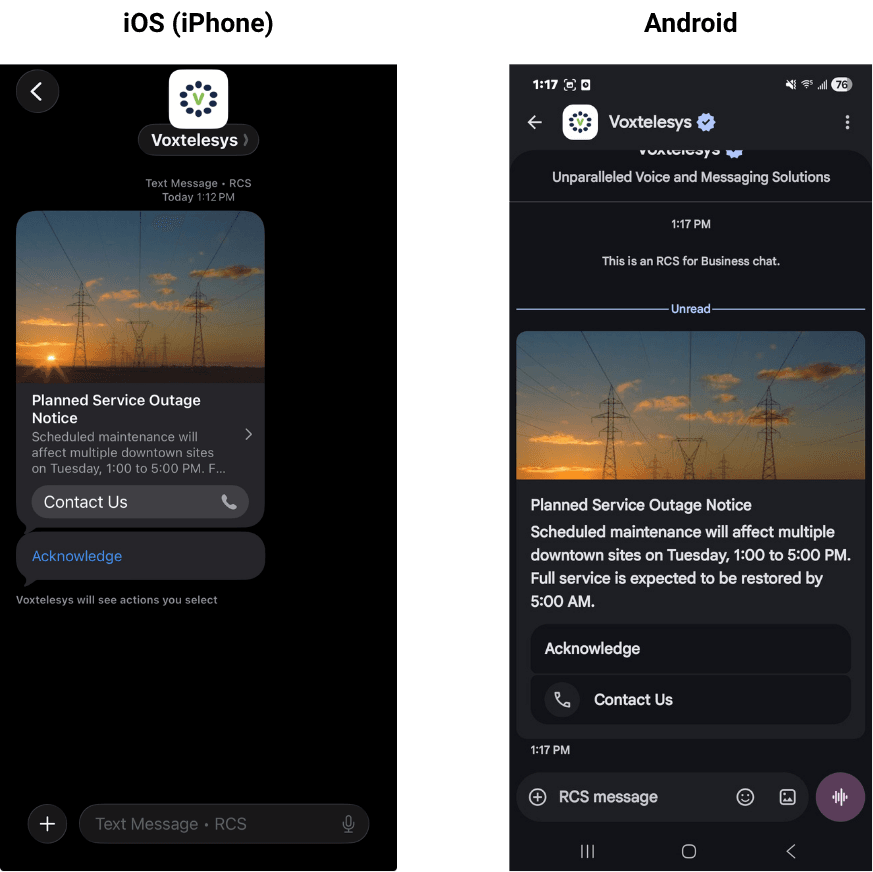
The image below outlines the general differences between iOS (left) and Android (right) in an RCS rich card message.


example images of RCS rich card messages

RCS rich cards render differently on Android and iOS. Android supports all available card heights (Short, Medium, and Tall), while iOS supports a fixed card height only.

Horizontal orientation displays as configured on Android. On iOS, horizontal orientation may cause display issues, including image truncation.

Carousels

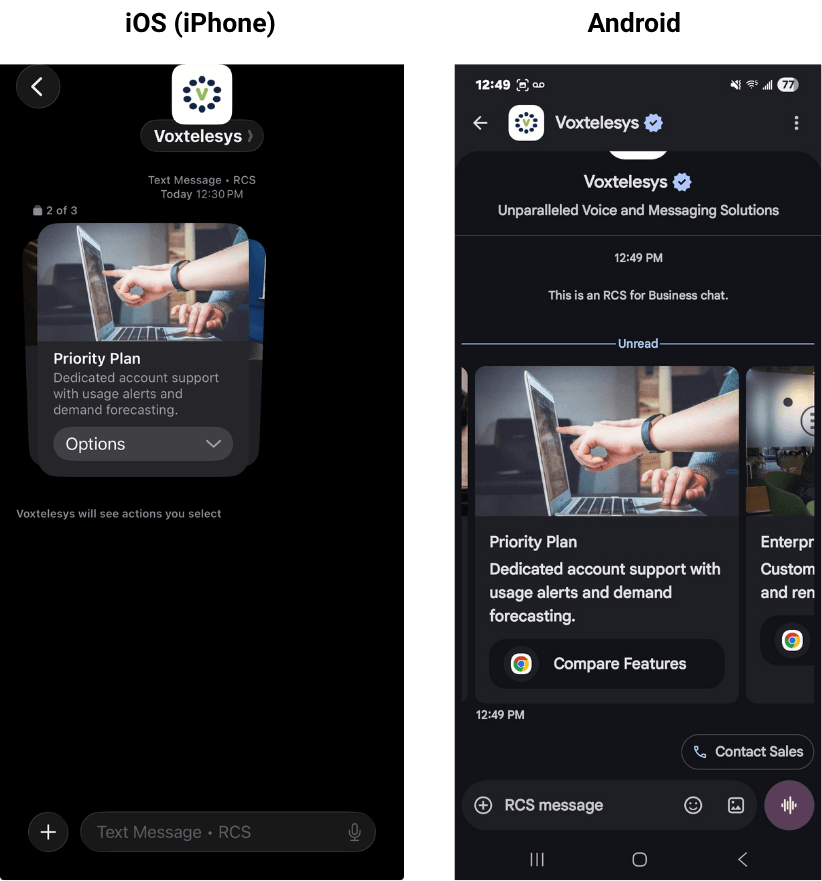
Carousels render differently depending on the device. On iOS, the carousel appears as a scrollable stack, and you view the buttons by tapping the Options dropdown on each card.

On Android, the carousel is fully visible and scrolls horizontally, with action buttons that appear and behave as intended.


example of an iOS and Android carousel


Carousels may also be truncated on iOS if a larger text size is used. Make sure to follow Best Practices for the best results.

Primary Buttons

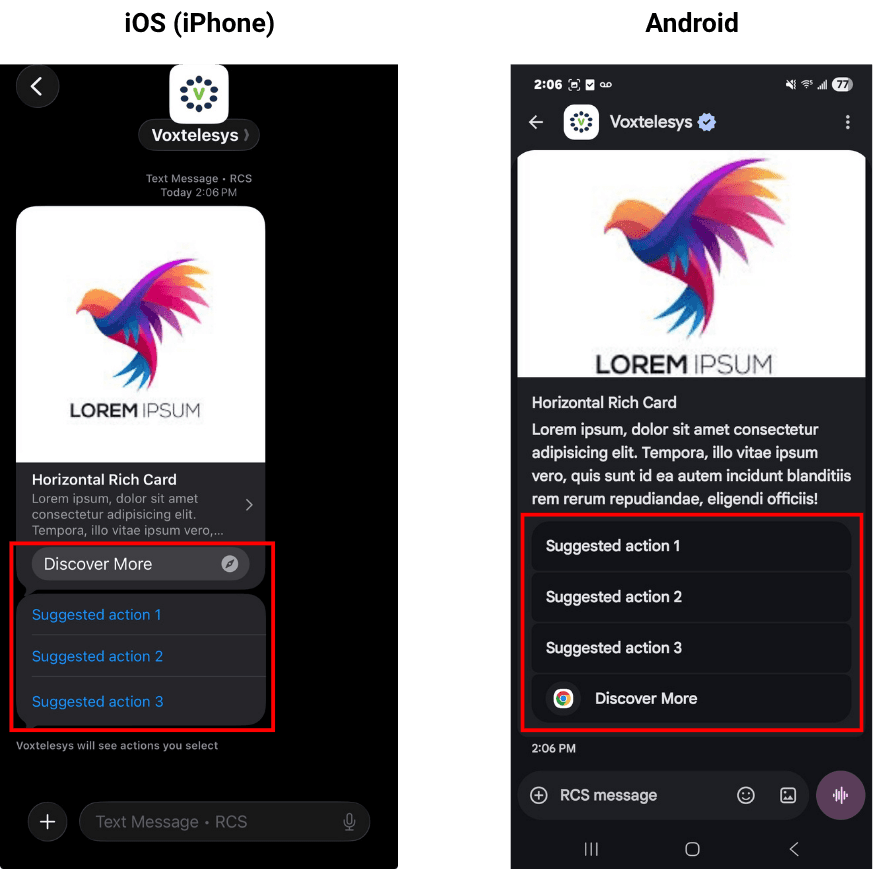
The image below outlines the general differences between iOS (left) and Android (right) in an RCS with primary buttons.

image of an rcs message with suggested actions and buttons


Primary buttons may appear in the wrong order on iOS devices. iOS may render primary buttons and secondary actions in a single group, or separately from the rich card, as shown above.


Secondary Actions

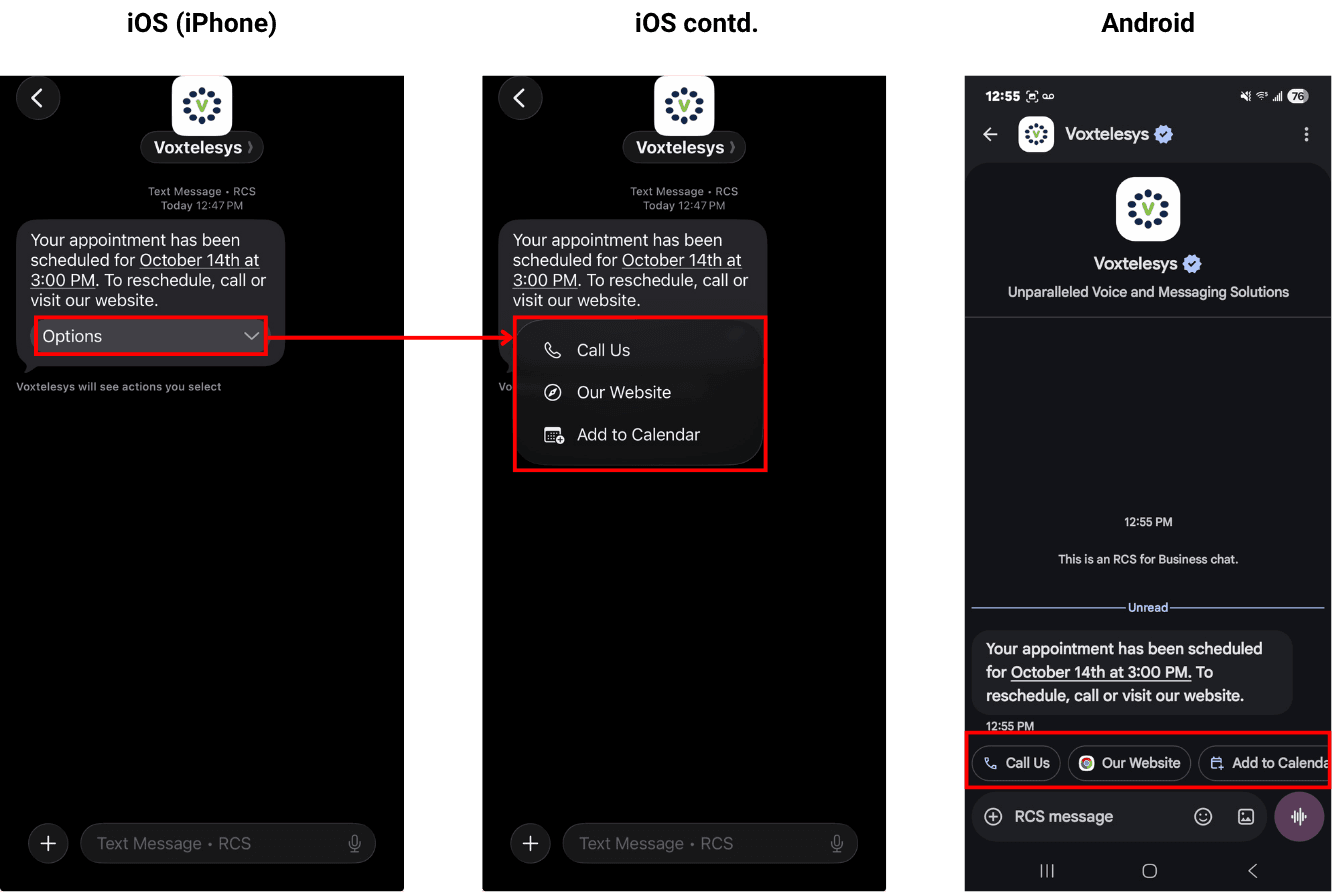
On iOS, secondary actions appear in an "Options" dropdown. On Android, primary buttons and secondary actions render as configured, with secondary actions shown as chips above the typing field.

The image below shows the difference between a plain-text RCS message on iOS and Android. On iOS, actions render in a "Options" dropdown connected to the message; on Android, the actions appear as chips above the typing field.


image with example of a RCS plain text message and secondary actions


On Android, secondary actions disappear after they are tapped, while on iOS, suggested replies remain visible after they have been tapped.

Listed below are additional behavior specifications to keep in mind when building RCS messages:


Behavior

Specification

Hyperlinks Hyperlinks embedded in rich card or carousel text are not clickable. Use the Open URL action button to direct recipients to a link..
Verified By Badge Appearance The verified sender badge description is determined by the carrier network and may vary by recipient.
One-Time Passwords (OTP) Do not include one-time passwords or sensitive information in rich cards. Use plain text messages for this type of content instead. If an OTP is included in a rich card title or description, then it cannot be copied.
Read Receipts and Typing Indicators iOS and Android both support Read Receipts and typing indicators. However, compatibility will vary depending on the carrier and on the device's settings. Messages that fallback to MMS/SMS will not support read receipts and typing indicators.

The practices below are recommended to ensure a consistent experience across platforms:


Practice

Description

Limit Rich Card Title & Description Length It is recommended to limit titles and descriptions to three lines.
Buttons & Actions Limit to 1 primary button and 3 secondary actions per RCS message.
Rich Card Height Set the rich card height to vertical tall. iOS renders at a single height, regardless of what is selected; the vertical tall height provides the best viewing experience for Android users.
Rich Card Orientation Select the vertical orientation. iOS rich card images with a horizontal orientation display incorrectly.
Carousels Limit card titles and descriptions to 3 lines, use 1 embedded button per card, and up to 3 secondary actions.
Hyperlinks Limit each message to one hyperlink and use the Open URL action so the link is clickable and a preview is available. Do not include URLs in rich card and carousel descriptions.
SMS/MMS Fallbacks If a recipient's device or carrier does not support RCS, the message will not be delivered unless an SMS/MMS fallback is configured. It is recommended to configure fallback options for all RCS messages to ensure reliable delivery across all recipients.
Preview & Test Test and preview any RCS messages that include rich media to ensure message consistency and quality.

Term

Definition

RCS Rich Communication Services (RCS) is the next generation of mobile messaging that replaces traditional SMS with rich, interactive features.
SMS Short Messaging Service (SMS) is a basic text messaging service widely used across all mobile devices. SMS is text-only and limited to 160 characters.
Verified Sender RCS messages are sent from a verified brand profile (not just a phone number), featuring your logo, brand name, and colors. This builds instant trust and significantly reduces the risk of phishing or fraud.
Actions/Suggested Reply Interactive buttons that are displayed with an RCS message. Up to 11 actions are allowed per RCS message. Actions are accessed in the RCS widgets.
Rich Media Rich media combines text, actions, and visuals into one RCS message. Media such as images, videos, files, and GIFs can be included. Rich media is displayed through rich cards and carousels.
Rich Card A single RCS message that combines media, text, and interactive buttons in one visual card.
Carousel A horizontally scrollable set of rich cards, letting you present multiple items or options in one message.
Fallback An SMS/MMS backup that delivers your message when a recipient's device or carrier does not support RCS.
Carrier The mobile network provider that delivers messages to a recipient's device.
Learning Hub / Tutorials / Voxtelesys / RCS Platform Behavior DifferencesFAQs